
Humata
Ask questions across your documents and get answers with citations you can check.
FreemiumFree planWeb
Last verified Jul 7, 2026
Ask questions across your documents and get answers with citations you can check.
Last verified Jul 7, 2026
Fast-read signals for fit, pricing, and trust.
Humata is a document-Q&A tool that answers questions across your uploaded files, summarizes them, and highlights citations so you can verify each answer. It is aimed at researchers, analysts, and teams working through dense documents who want fast answers they can trace. Citation highlighting and secure team data rooms distinguish it. Answers come from your files, so quality depends on the documents and still warrants a check against the source.
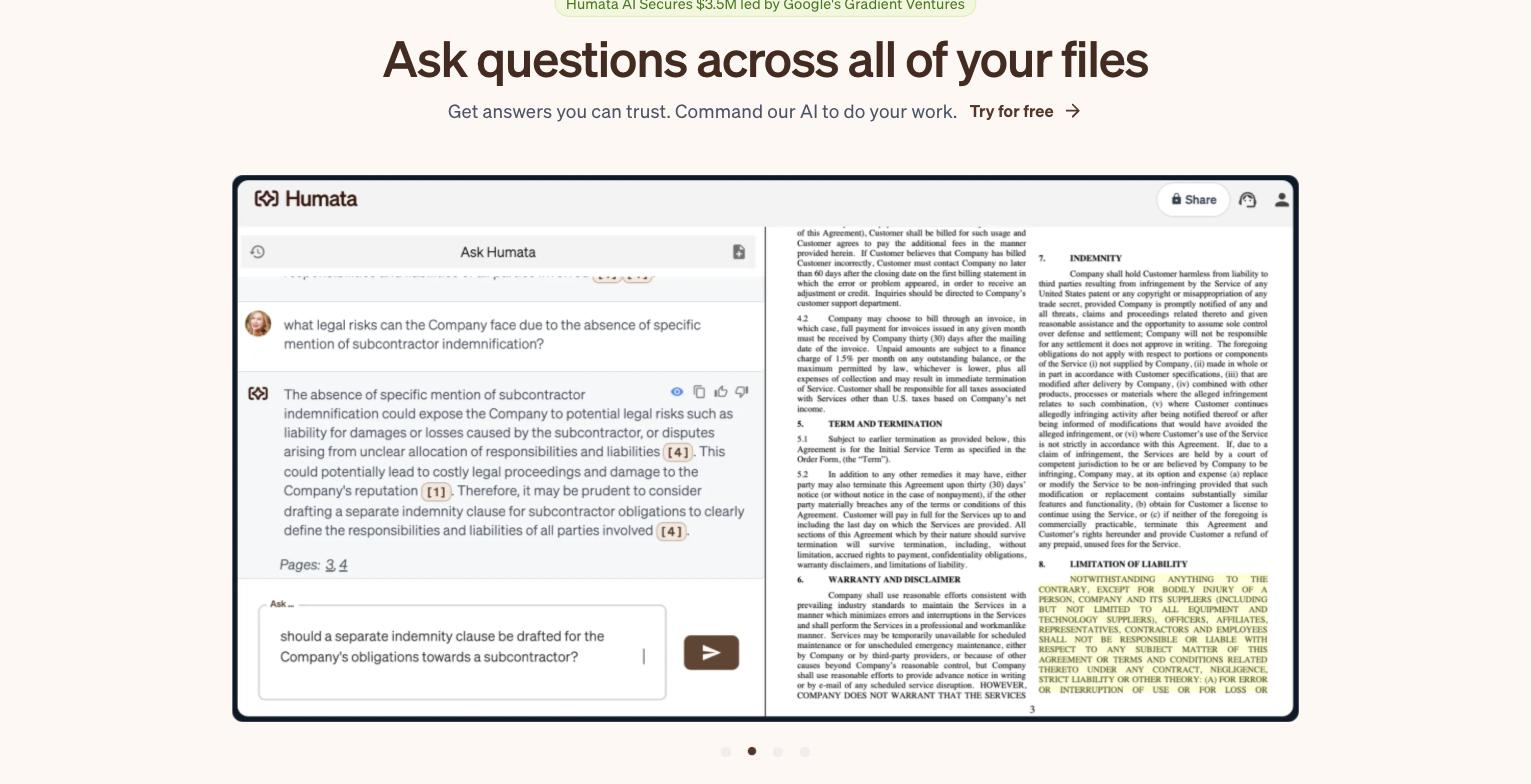
You upload files and ask questions across them, getting answers with highlighted citations back to the source, plus summaries and comparisons; teams can use secure data rooms with role-based access, and an embeddable option puts the AI on a webpage.
It suits researchers, analysts, legal and technical teams who work through long or numerous documents and need quick, traceable answers rather than reading everything.
Answers are grounded in the files you provide and citations let you verify, but it can still misread or miss context, so checking the cited source matters for anything important.
Humata's core strength is answering questions across your documents with a verifiable citation trail, rather than producing a generic standalone summary.
Quick fit check against how you actually work.
![Humata's two-pane document interface: a left 'Ask Humata' chat where the question 'how do I create an iN cell?' returns a multi-sentence AI answer with inline citation chips [4], [5], [3] and [1] and an 'Ask...' input, beside a right pane showing the source scientific PDF the answer was drawn from.](https://cdn.sanity.io/images/1szzodff/production/e62ade6209a881c3aaee5ac1305e0e66cd3828e1-1070x508.png)
What you can actually do with this tool.
Answers questions spanning your uploaded documents, not one file at a time.
Highlights the source behind each answer, so you can verify rather than trust blindly.
Summarizes long documents and findings to save reading time.
Offers secure data rooms with role-based access for team use.
Embeds the document AI on a webpage for visitors or staff.
Compares documents to surface differences and overlaps.
Pricing tiers and what's included in each.
Humata offers a free plan (up to 60 pages, 1 user) plus paid plans: Expert at $9.99/month, Team at $49/user/month, and a custom Enterprise plan.
A short path to first value.
Ask questions across all your files and get the answer (PDF AI)
Common questions about this tool, answered.
Treat them as grounded but checkable — citations let you verify the source, which matters because it can still misread or miss context.
Yes — it answers questions spanning multiple documents and can compare them, not just one file.
It offers secure data rooms and role-based access, though for sensitive material confirm the current data and retention terms first.
It answers from your uploaded files with citations, rather than from the open web, so it's built for working through your own documents.
Context for choosing between this tool and alternatives.
For document Q&A, weigh citation depth and security against breadth. Humata pairs cited answers with secure data rooms for teams. General assistants answer more broadly but without your files grounded; site-trained bots target visitors, not internal research. Compare on whether traceable answers over your own documents is the core need.
Other tools that show up for the same kind of work.
Avoma
Freemium
Granola
Freemium